





.png)



Keeping every Mac on the same version of a CLI tool shouldn’t feel like herding cats. Today we’re excited to announce native Workbrew installation via Swif.ai’s App Installer. In minutes you can push the Workbrew client to every managed Mac and start controlling all brew packages from a single, cloud-hosted dashboard.
1 · How to Deploy Workbrew With Swif.ai’s App Installer
- Open Swif.ai and navigate to Device Management → Applications.
- Click “Workbrew Template” You’ll see the notarized, Swif.ai-hosted Workbrew installer along with version details.
- Click Install — or assign Workbrew to an existing device group for zero-touch rollout.
- Sit back. Swif.ai delivers the package silently via APNs, verifies the checksum, and reports success. If a Mac is offline, the agent retries for 30 days; if a user kills the process, Swif.ai‘s watchdog restarts it.
- Verify in real time. The device’s Software tab flips to Installed and the Workbrew agent registers with your org’s Workbrew cloud.
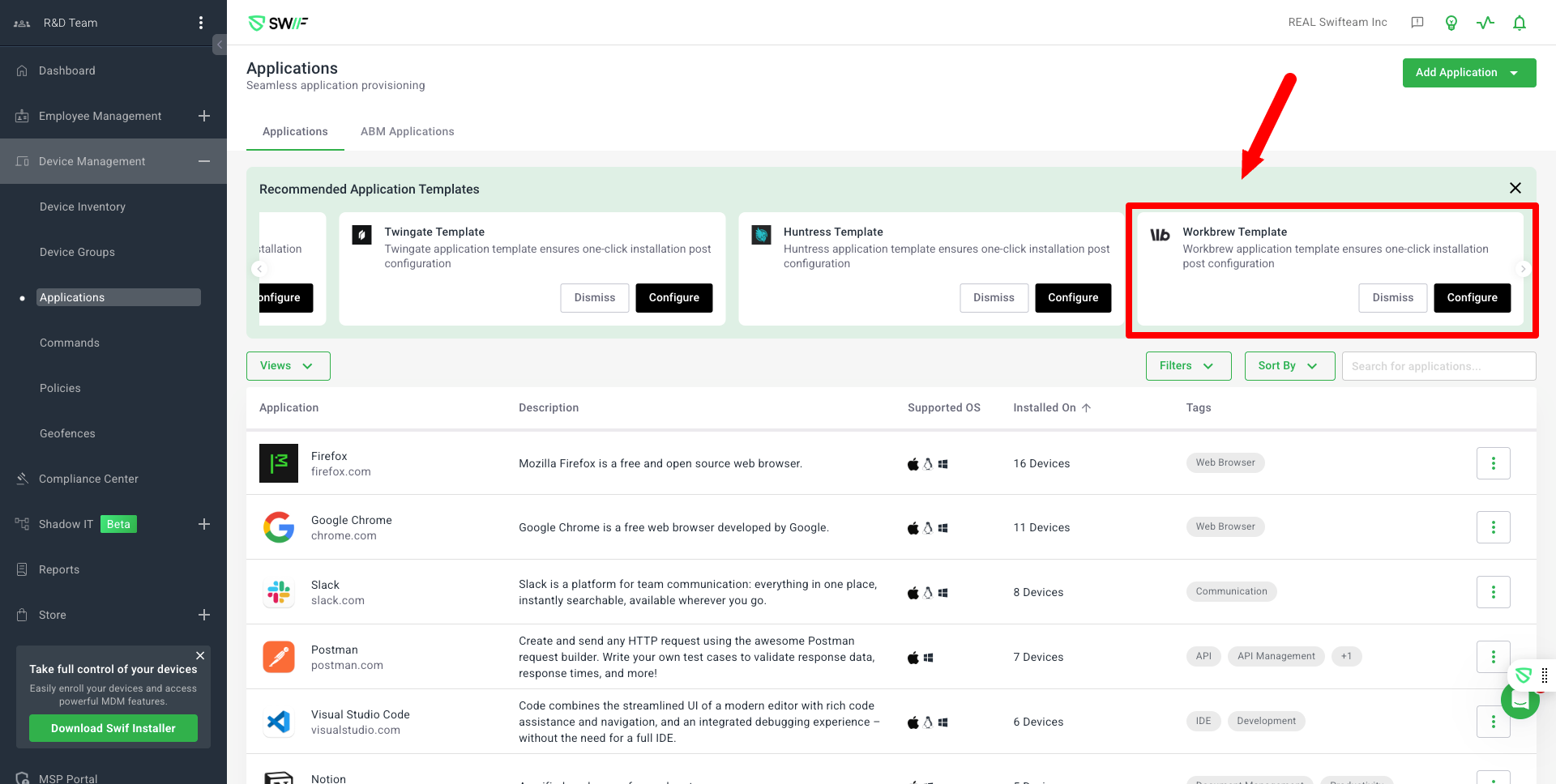
That’s it. One click to deploy Workbrew to your fleet of devices.
2 · Why Workbrew Beats Ad-Hoc Homebrew Scripts
- Fleet-wide consistency – One centrally defined package set replaces dozens of drifting shell scripts.
- Real-time inventory – Workbrew feeds Swif.ai with an up-to-date list of every package and version on every Mac.
- Safer supply chain – A notarized PKG delivered via MDM Software is far safer than piping arbitrary scripts into bash.
- Bandwidth savings – Workbrew’s P2P caching reduces repeated downloads across the office VPN.
3 · How the Integration Helps IT Move Faster
- Zero-touch onboarding – New Macs arrive, enroll, and auto-install the entire developer toolchain.
- Instant remediation – Push a version bump or security patch to any subset of Macs in seconds.
- Audit-ready logs – Swif.ai tracks who pushed what, when, and to which devices, satisfying SOC 2 and ISO 27001 evidence requests.
- Least-privilege installs – Users stay standard; Workbrew operates with the agent’s system rights.
Ready to Tame Homebrew Sprawl?
Deploy Workbrew in less time than it takes to refill your coffee.
👉 Learn more & get started
Because Macs deserve painless package management—and so do you.



.webp)



