





.png)


Onboarding a remote employee is very different from office onboarding. When a new hire walks into an office they see colleagues, get handed a badge, and are in the work environment. But remote workers get none of that ambient infrastructure. Every access grant, every device configuration, every tool introduction has to be deliberate, sequenced, and confirmed. When the employee can’t access a system, they can’t get up and go ask the manager.
What follows is the operational checklist that IT and Ops teams need to run before and on day one. Not the HR version focused on culture decks and org charts, but the one that determines whether a remote employee can actually do their job.
Time tracking and work visibility
Remote work creates a visibility gap that office work doesn't have. Managers can't see work happening. That's not inherently a problem, but it does mean you need instrumentation in place before the employee's first day.
That’s why you need to configure time tracking as part of the provisioning sequence, not as an afterthought once the employee is already mid-project.
Tool: WebWork Time Tracker
WebWork is a workforce management and time tracking platform that covers the full remote visibility stack: automatic, manual, and silent tracking modes, real-time monitoring, app and website usage tracking, activity levels, and AI-powered productivity insights. For remote onboarding specifically, managers should configure which tracking mode applies to the role and assign the employee to the correct projects and tasks from day one. WebWork runs on Windows, macOS, Linux, iOS, and Android, so it handles mixed-device environments without special configuration per OS.
The tracking mode decision matters more than most teams realize, and it should be made at the role level before the employee starts. Automatic mode runs continuously and is best for remote teams where consistent accountability and client billing accuracy are priorities. Manual mode lets employees start and stop tracking themselves.
For company-owned devices, WebWork offers a Silent Tracker that runs invisibly in the background without any employee interaction. It is installed and accessible by admins only. The employee does not see it, configure it, or start it manually. Silent Tracker captures time, app and website usage, and activity levels continuously while the device is in use, giving IT and ops teams a complete picture of device activity. Because it is admin-controlled and installed at provisioning, it slots naturally into the MDM setup sequence.
Checklist:
- Create the employee's account and assign them to their team and projects
- Configure tracking mode (automatic, manual, or silent) per role policy
- Set up screenshot frequency and monitoring preferences if applicable
- Confirm the employee has installed the desktop app and successfully tracked a test session
- Enable manager notifications or daily reports
Device provisioning and MDM enrollment
The employee needs a managed, compliant device before they can access anything else. Unmanaged devices are a compliance liability and a security exposure. If the employee is using a personal device (BYOD), that requires its own policy track: a work profile, restricted app access, and clear boundaries on what the MDM can and cannot see.
Tool: Swif.ai
Swif.ai is a unified endpoint management platform that handles MDM enrollment, device configuration, compliance enforcement, and security monitoring across macOS, Windows, Linux, iOS, and Android from a single console. For remote onboarding, it supports zero-touch enrollment so devices arrive pre-configured, and it enforces baseline security policies automatically at enrollment. If a device falls out of compliance, Swif flags it and can lock the device until resolved. When the employee eventually leaves, Swif handles the offboarding side too: remote wipe or lock initiated from the same dashboard that provisioned the device on day one.
Checklist:
- Enroll the device in Swif.ai before shipping or on day one
- Apply the correct configuration profile for the role (developer, sales, ops, etc.)
- Confirm disk encryption is active and key is escrowed
- Verify the device passes compliance benchmark before granting system access
- Log the device serial number and assignment in your asset inventory
Communication and collaboration tools
New employees need to know where decisions get discussed, where to ask questions, or which channels are active versus archived. Channel structure, naming conventions, notification norms, and async communication expectations all need to be shared ideally with a proper documentation.
Tool: Slack
Slack's value in remote onboarding is less about the product itself as most employees already know how to use it and more about configuration. Pre-invite the employee to the channels they need before day one: their team channel, relevant project channels, and general announcements channel. Pin a channel guide in the general channel that documents naming conventions, which channels are for decisions versus discussion, and response time expectations. Set up Slackbot reminders for key first-week tasks. If the company uses Slack's Workflow Builder, an automated onboarding workflow like a series of messages that walk the employee through their first week costs one hour to build and scales to every hire after that.
Checklist:
- Create the employee's Slack account and pre-invite them to required channels
- Share a channel directory or guide on their first day
- Introduce them in the team channel before they log in for the first time
- Configure notification defaults for their role (on-call teams need different settings than ops)
- Document async communication norms somewhere findable — not buried in a thread
Project and task management
The employee needs context on what they're walking into: active projects, their first deliverables, who owns what, and where work is tracked. The hiring manager should prepare a first-week task list before the employee starts. And ops should ensure the project management tool is ready for them to use immediately.
Tool: Asana
Asana's onboarding feature set is purpose-built for this problem. Create an onboarding project template that includes the employee's first 30/60/90 day milestones, assign it to them before day one, and create their initial tasks. Everything they need to know like who to meet, what to read, what to produce and when, lives in one place. Managers can track first-week completion without scheduling check-in calls for every small item. For teams already running project work in Asana, adding the employee to existing projects and assigning them their initial tasks takes minutes once the template is in place.
Checklist:
- Create the employee's Asana account and add them to their team's workspace
- Assign an onboarding project with first-week and first-month tasks pre-populated
- Add them to active projects relevant to their role
- Tag them in existing tasks they'll own or contribute to
- Confirm the due dates and priorities make sense given their start date
Knowledge base and documentation access
The new employee should receive a curated starting path, including a proper knowledge base and documentation introduction.
Tool: Notion
Notion works for remote onboarding because it supports nested, linked pages and can be organized into a genuine knowledge hierarchy rather than a flat file dump. Build a dedicated onboarding hub like a top-level page that links to the essential reading for their role: company strategy, team structure, how the product works, key processes they'll interact with immediately, and a glossary of internal terminology. Archive or unpublish stale content so the employee isn't reading outdated docs. If your Notion is already well-organized, adding a new-hire view is low-effort. If it isn't, onboarding a remote employee is a good forcing function to fix it.
Checklist:
- Create the employee's Notion account and grant access to their team workspace
- Build or share a role-specific onboarding reading path (not the entire workspace)
- Confirm all docs linked in the reading path are current and accurate
- Give the employee a way to flag outdated documentation so the team can fix it
- Identify who owns documentation updates for their area and introduce them
Security training and policy acknowledgment
Before any employee touches a production system, they should complete security awareness training and formally acknowledge the acceptable use policy.
Tool: KnowBe4
KnowBe4 is a security awareness training platform with a library of role-appropriate training modules and automated phishing simulations. For onboarding, assign a baseline training curriculum before day one and set a completion deadline. Track completion from the admin dashboard as you'll need that data for your next SOC 2 or ISO audit. KnowBe4's phishing simulation feature runs in the background after onboarding, sending periodic test emails that measure whether training translated into behavioral change. Completion records are exportable and audit-ready.
Checklist:
- Assign baseline security awareness training before day one with a hard completion deadline
- Require formal acknowledgment of the acceptable use policy (signed or click-to-accept)
- Record completion in a system that produces audit-ready evidence
- Add the employee to the phishing simulation rotation
- Confirm they know how to report a suspected phishing email or security incident
Payroll, contracts, and HR systems
IT and Ops should not own this category but they should confirm it's done before day one. An employee who cannot access their pay information, hasn't signed their contract, or isn't enrolled in benefits will raise those issues during the first week. A quick pre-boarding confirmation checklist solves this.
Tool: Deel
Deel handles global contractor and employee onboarding, including contract generation, e-signature, payroll, benefits enrollment, and compliance documentation across 150+ countries. For remote teams with international hires, it eliminates the legal and administrative complexity of employment in jurisdictions where the company has no entity. The Deel dashboard gives IT and Ops visibility into where each new hire stands in the contract and payroll process without requiring access to HR systems. Deel integrates with Slack, so onboarding status updates can flow to the right channel automatically.
Checklist:
- Confirm offer letter and NDA are signed before day one
- Confirm payroll is set up and the employee knows when and how they'll be paid
- Benefits enrollment complete (or scheduled within the required window)
- Confirm the employee's tax forms and compliance documents are collected
- Introduce the employee to how they submit expenses or invoice for reimbursement
Equipment and peripherals
Most companies have a device policy for the primary laptop. But fewer have a defined process for everything else such as monitor, headset, desk chair, webcam, keyboard. Remote employees often wait weeks for peripheral equipment if there's no defined process and that wait can show up in productivity and onboarding experience.
Tool: Firstbase
Firstbase is a remote equipment provisioning platform that manages the full lifecycle of remote office equipment: ordering, shipping, tracking, and retrieval. Define a standard remote equipment package per role, and Firstbase handles procurement and delivery. Employees get a single interface to request approved items, track shipping, and report issues. For IT, it provides an asset inventory that covers peripherals and handles retrieval logistics when an employee leaves. If Firstbase isn't in your stack, the minimum requirement is a documented equipment policy: what's provided, what's reimbursable, the approval process, and the return process.
Checklist:
- Define the standard equipment package per role (laptop, monitor, headset, webcam)
- Ship or arrange delivery before the employee's start date
- Confirm the employee has what they need to work on day one
- Log all equipment in your asset inventory (serial numbers, assignment dates)
- Document the return process and communicate it at onboarding, not at offboarding
Offboarding readiness, built at onboarding
Every access you grant at onboarding should be logged, assigned, and reversible. Offboarding failures like former employees retaining access, unrecovered devices, or orphaned accounts in SaaS tools, happen because access wasn't tracked when it was created. The time to build the offboarding checklist is day one, not the day someone resigns.
MDM enrollment means any company device can be wiped or locked remotely. IdP provisioning means disabling all SaaS access is a single action. Both of those are only true if enrollment and provisioning were done correctly at onboarding.
Checklist:
- Confirm every access grant is logged in a system of record (IdP, ITSM, or spreadsheet)
- Confirm MDM enrollment is complete and the device is in your console
- Create the offboarding checklist now: access to revoke, devices to recover, accounts to close
- Assign an owner for offboarding execution and don't leave it to whoever is available the day it happens
- Test your offboarding process quarterly on departed accounts to confirm no orphaned access remains
Try WebWork for free today
Remote onboarding is one of the first real tests of whether your ops infrastructure holds up. WebWork gives IT and ops teams the time tracking and workforce visibility layer they need from day one. Across every device, every OS, and every tracking preference. You can set up your workspace and onboard your first remote employee in under an hour. Start your 14-day free trial today.
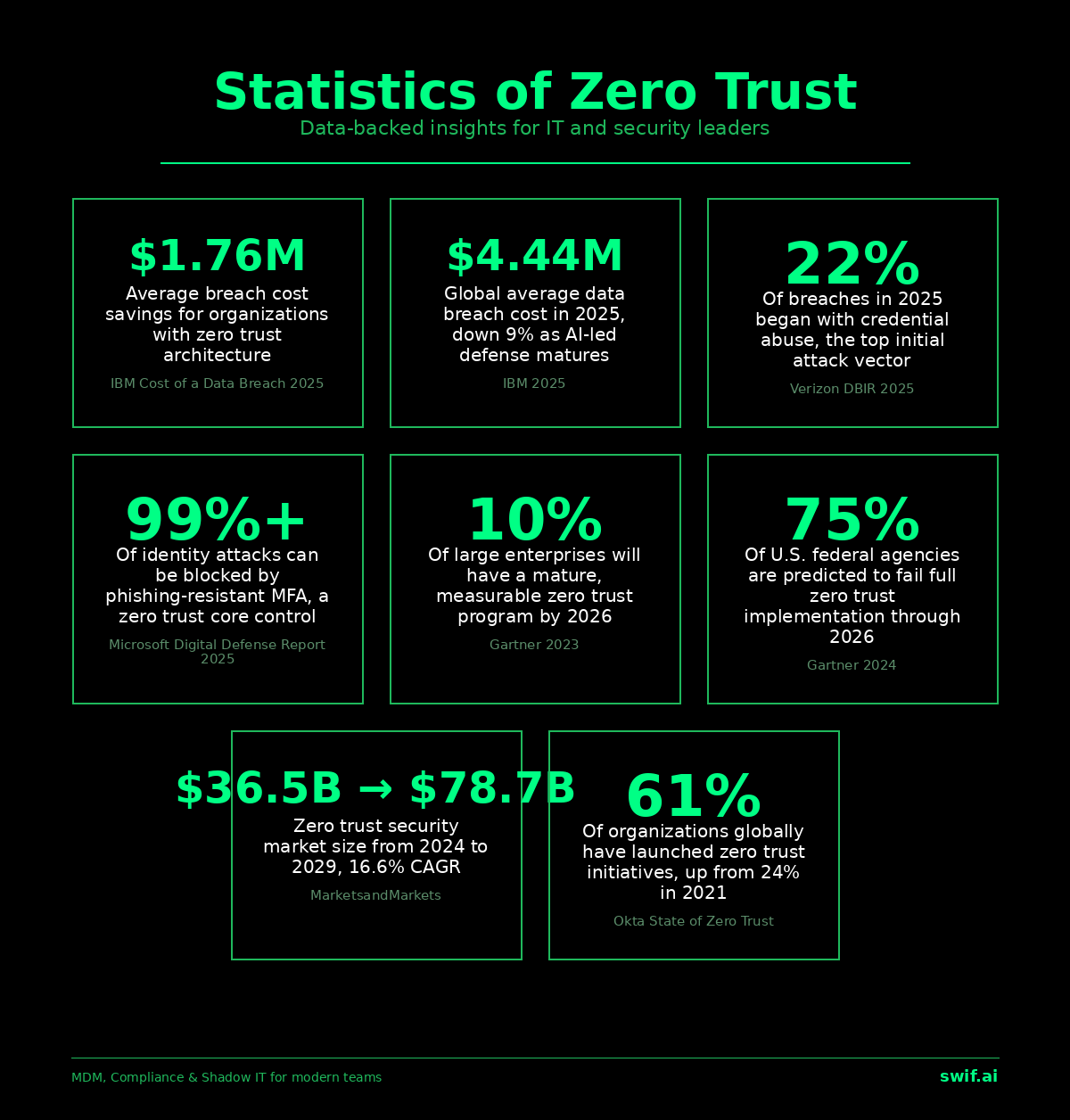
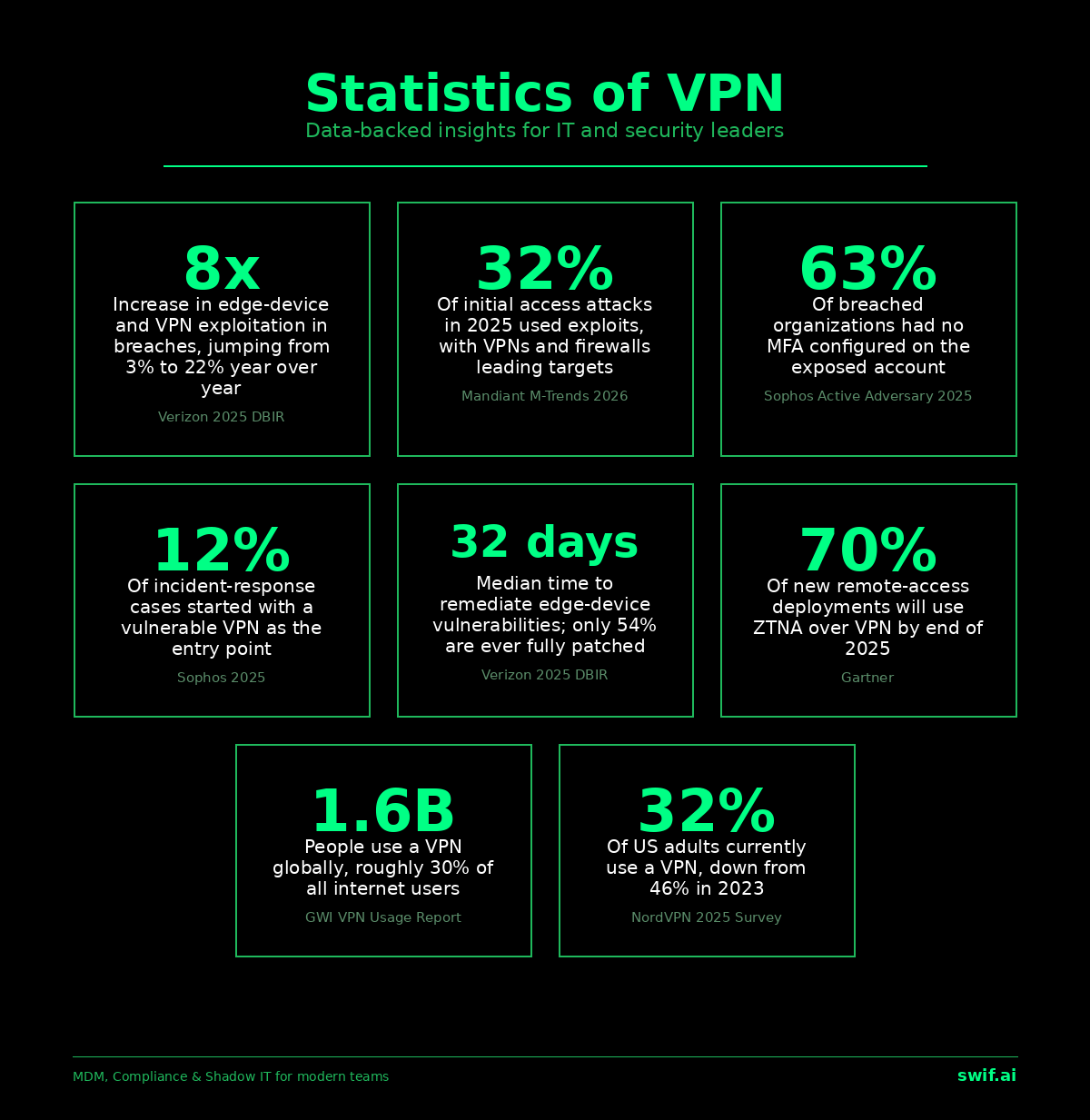
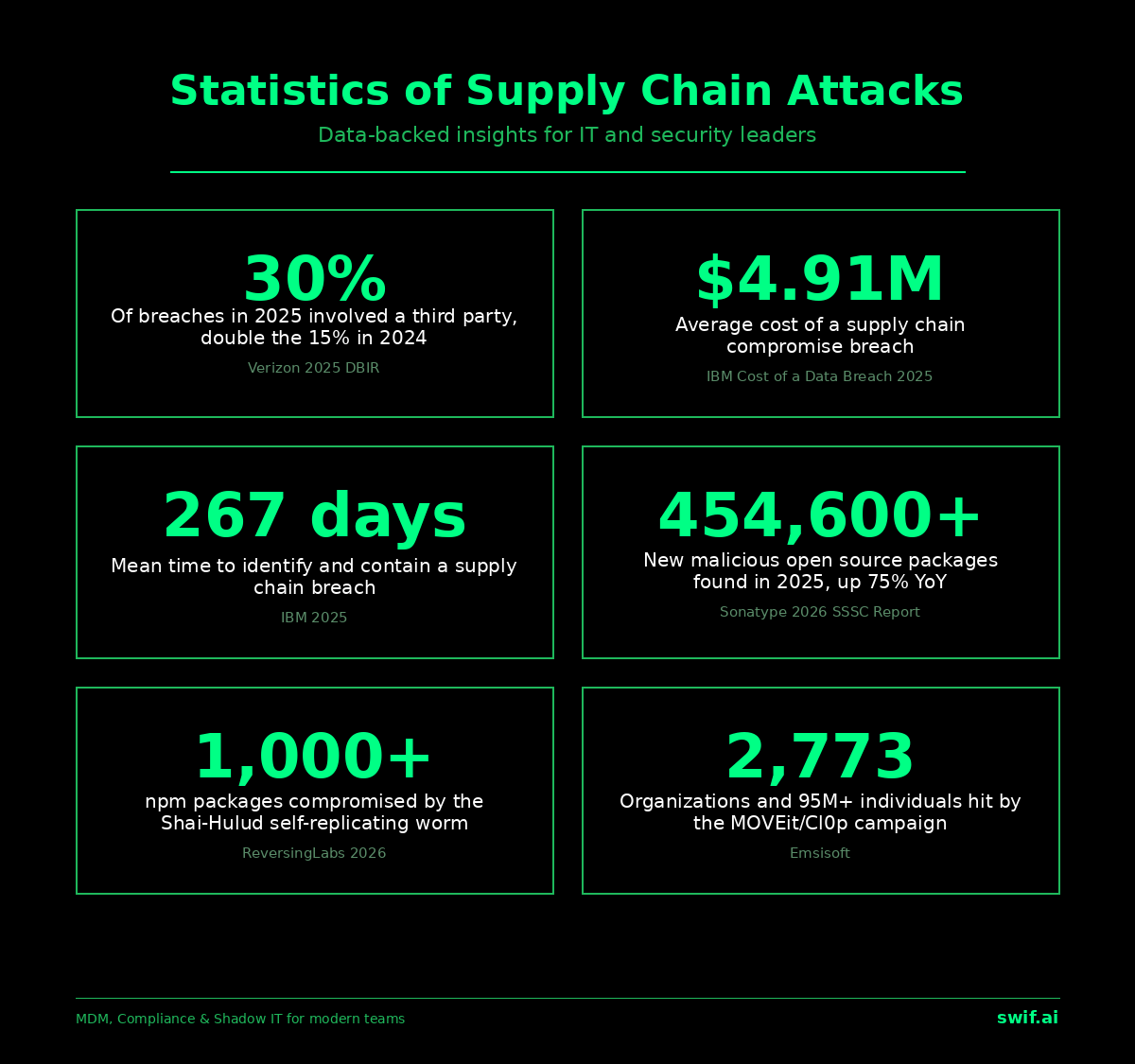
We also have very detailed IT and cybersecurity statistics on this page if you require them for your research.


.webp)



