





.png)



Patching is the single most effective thing you can do to reduce the attack surface of a Linux fleet. That statement sounds simple, almost obvious, but the gap between knowing it and executing it consistently across hundreds or thousands of endpoints is where most organizations fail. Unpatched systems account for a staggering share of breaches — not because the vulnerabilities were unknown, but because the patches sat in a queue while other priorities took precedence. This guide covers how to automate and structure patch management for Linux devices managed through MDM, from package manager mechanics to staged rollout strategies that keep production stable.
The real cost of unpatched systems
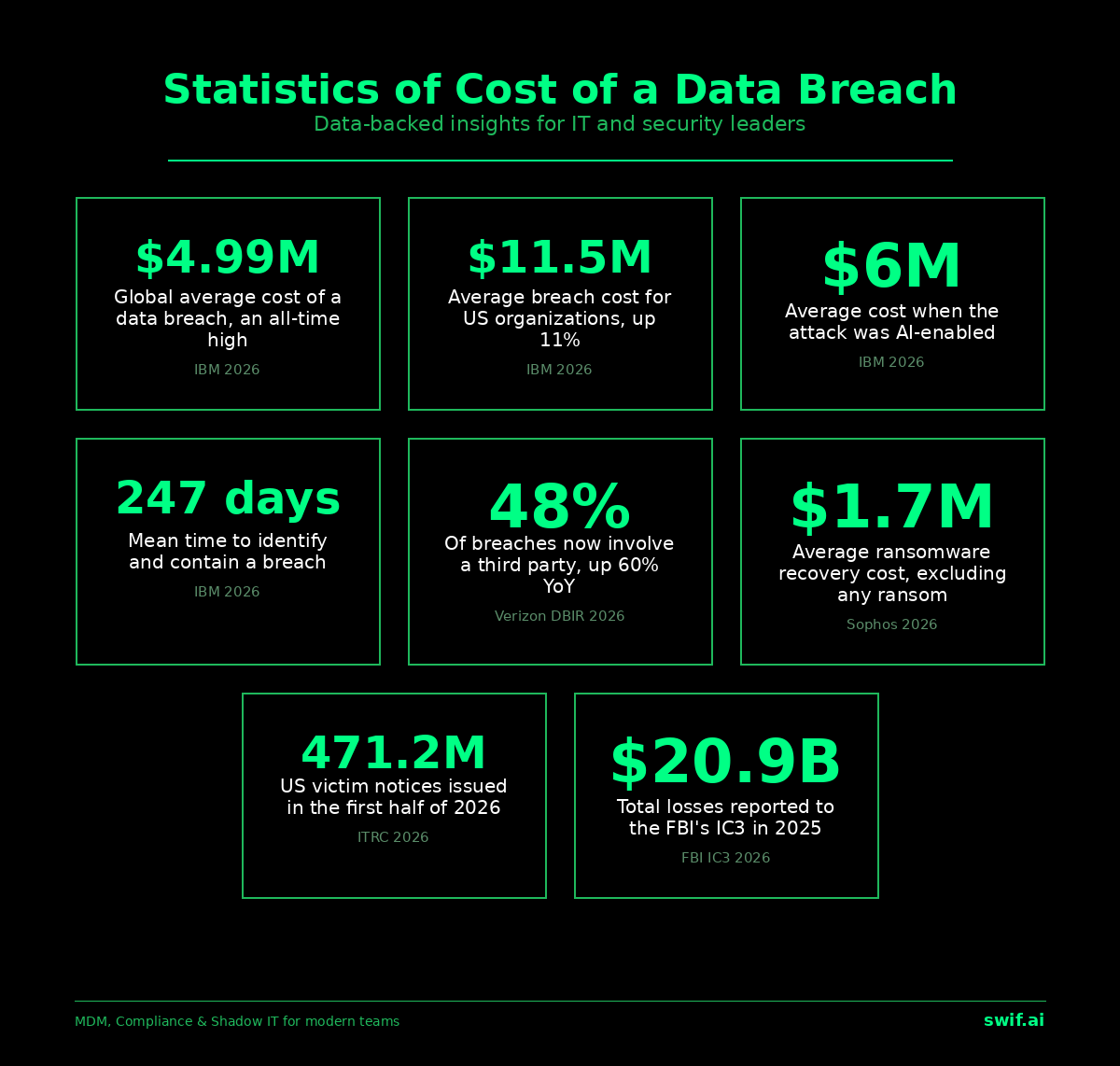
Every unpatched vulnerability is a window. Some windows stay open for hours, others for months. Research consistently shows that the median time from CVE disclosure to active exploitation has been shrinking, with some vulnerabilities being weaponized within days of public disclosure. When a patch exists but hasn't been applied, the organization sits in a known-vulnerable state — the worst possible position, because attackers have the same access to vulnerability databases that defenders do.
The costs extend well beyond the technical. Compliance frameworks like SOC 2, ISO 27001, and HIPAA all require evidence that systems are kept current. An auditor finding a fleet of Linux servers running three-month-old kernels with known CVEs won't accept "we were planning to get to it" as a control. Fines, failed audits, and lost customer trust follow. And then there's the operational cost of incident response when an unpatched vulnerability gets exploited — the forensics, the remediation, the disclosure obligations. All of it dwarfs the effort of applying the patch in the first place.
Why manual patching falls apart at scale
A sysadmin managing five servers can SSH in, run the updates, verify the output, and move on. That same sysadmin managing fifty servers is already scripting the process. At five hundred servers across multiple distributions, manual patching is no longer a viable strategy — it's a liability.
Patch fatigue is real. When every week brings a new batch of updates across Ubuntu, RHEL, CentOS, Debian, and maybe some Arch-based workstations, the sheer volume creates decision paralysis. Which patches go first? Which ones can wait? Which ones require reboots that need coordination with application teams? Without a systematic approach, teams either patch everything aggressively and deal with breakage, or they delay and accumulate risk. Neither outcome is acceptable.
The answer is automation through MDM, and specifically automation that understands how Linux package management actually works.
Working with native package managers, not against them
One of the advantages of patching Linux systems is that the ecosystem already has mature, well-tested update mechanisms. There's no need for proprietary patch formats or custom binary distribution. APT handles Ubuntu and Debian systems. YUM and its successor DNF manage CentOS and RHEL families. Pacman covers Arch-based distributions. Each of these tools knows how to resolve dependencies, verify package signatures, and handle pre- and post-installation scripts.
A well-designed MDM patch management system issues commands through these native tools rather than trying to replace them. On a Debian-based device, that means running `apt update && apt upgrade` with the appropriate flags. On RHEL, it's `dnf update` with the relevant options. The MDM layer adds scheduling, targeting, reporting, and policy enforcement on top of what the package managers already do well. This approach means fewer surprises — the same update mechanism your team already knows and trusts is doing the actual work. The MDM just makes it happen at the right time, on the right devices, with the right safeguards.
Swif.ai's Linux MDM takes this approach, orchestrating patches through native package managers while adding the fleet-wide visibility and policy controls that individual package managers lack.
Scheduling policies that match operational reality
Not all patches deserve the same urgency. A critical remote code execution fix for OpenSSL needs to go out immediately — within hours, not days. A minor version bump for a text editor can wait for the next regular maintenance cycle. Kernel updates, which typically require a reboot, need their own scheduling logic entirely.
Effective patch scheduling usually follows a tiered model:
- Critical security patches (CVSS 9.0+): pushed within 24 hours, often with automatic application and deferred reboot if needed
- High-severity patches (CVSS 7.0–8.9): applied within 7 days, scheduled during low-traffic windows
- Medium and low-severity updates: batched into weekly or biweekly maintenance windows
- Kernel updates: scheduled during designated maintenance periods with coordinated reboot plans
Unattended upgrades deserve special mention. For non-disruptive patches — security fixes to libraries, userspace tools, and services that can be restarted without downtime — automatic, unattended application makes sense. Ubuntu's `unattended-upgrades` package and similar tools on other distributions handle this natively. The MDM layer ensures the configuration is consistent across the fleet, monitors for failures, and reports on what was applied.
Patch prioritization and risk assessment
CVSS scores provide a starting point, but they're not the whole picture. A CVSS 7.5 vulnerability in a library used by an internet-facing web server is far more urgent than a CVSS 9.0 vulnerability in a package installed on air-gapped development machines. Context matters.
Good patch prioritization considers several factors together. The CVSS base score gives you severity. Exploit availability — whether proof-of-concept code or active exploitation exists in the wild — tells you how urgent the threat is. The endpoint's role and exposure level determine the blast radius if the vulnerability is exploited. An internet-facing production database server and an internal developer laptop don't carry the same risk profile, even when they share the same unpatched CVE.
MDM tools that integrate with vulnerability intelligence feeds can automate much of this assessment. Instead of a flat list of available updates, administrators see a prioritized queue: these five patches have known exploits and affect production systems, handle them now; these twenty are important but can go into the next maintenance window; these fifty are routine and can be handled automatically.
Staged rollouts that protect production
Pushing a patch to every device simultaneously is a gamble. Most of the time it works fine. Occasionally, a package update introduces a regression — a broken dependency, a configuration file conflict, a kernel module incompatibility — and suddenly the entire fleet is affected.
Staged rollouts eliminate this risk. The concept is straightforward: apply the patch to a small group first, watch for problems, then expand. A common progression looks like this. First, a canary group of 5–10 devices — often non-production systems or devices owned by the IT team — receives the update. If no issues surface after a defined observation period (usually a few hours for critical patches, a day or two for routine ones), the rollout expands to 25% of the target fleet. Then 50%. Then 100%.
The key feature that makes staged rollouts operationally sound is automatic halt on failure thresholds. If more than a defined percentage of devices in any stage report errors — failed package installations, service crashes post-update, health check failures — the rollout pauses automatically. This gives the team time to investigate before more devices are affected.
Group-based policies add another dimension. Development environments might receive patches first with minimal gates. Staging environments follow with a short observation window. Production systems go last, after the patch has proven stable in earlier stages. This mirrors the deployment pipeline most engineering teams already use for application code, and it works just as well for system patches.
Cross-distribution coordination
Mixed Linux fleets are common. A company might run Ubuntu on developer workstations, RHEL on production servers, and Debian on edge devices. A single CVE might be tracked as different package versions across these distributions, with patches released on different timelines.
A unified CVE view across all distributions cuts through this complexity. Rather than checking three different security advisory feeds and mentally mapping them to each other, administrators see one consolidated view: CVE-2025-XXXXX affects packages A (Ubuntu), B (RHEL), and C (Debian), and patches are available for all three. Or patches are available for two out of three, which means the third needs compensating controls until its update ships.
Dependency conflicts require careful handling, particularly when organizations run packages from third-party repositories alongside distribution defaults. The MDM system should detect and flag conflicts before they cause failed installations across the fleet. Dry-run capabilities — simulating the update without applying it — are valuable here.
Kernel updates warrant their own discussion. They almost always require a reboot, which means coordination with application teams, load balancer adjustments, and sometimes customer notification. For details on managing this at scale across large fleets, see the guide on Linux MDM at scale. The MDM should track which devices need a reboot after a kernel update and facilitate scheduling those reboots without manual intervention. Rollback capability — the ability to boot into the previous kernel if the new one causes problems — is non-negotiable for production systems.
Reporting, audit trails, and compliance evidence
Visibility into patch status across the fleet serves two audiences: the operations team trying to keep systems current, and the compliance team trying to prove it.
Real-time dashboards should show, at minimum, what percentage of devices are fully patched, which devices have outstanding critical patches and how long those patches have been available, and which patches failed to apply and why. SLA tracking turns this data into actionable metrics. If your policy states that critical vulnerabilities must be patched within 24 hours and high-severity within 7 days, the dashboard should show whether you're meeting those targets and flag exceptions.
For compliance purposes, automated evidence generation saves enormous amounts of time. Instead of manually assembling spreadsheets before an audit, the system should produce reports showing patch application dates, current patch status across the fleet, and historical compliance rates. SOC 2 Type II audits, for instance, require evidence of consistent controls over time, not just a point-in-time snapshot. For deeper coverage of how patch management fits into broader compliance requirements, see the guide on Linux MDM compliance.
Audit trails should capture who approved each patch policy, when patches were applied to each device, whether any patches were deferred or exempted and by whom, and rollback events with their justifications. This level of detail matters during security incidents when investigators need to determine whether a compromised system was running the latest patches and, if not, why not.
Practical next steps
Start by inventorying your current state. How many Linux devices are in your fleet, what distributions are they running, and what's the current patch lag? If you don't know the answer, that's your first problem to solve. Next, define your patch SLAs — how quickly each severity level needs to be addressed. Then implement staged rollout policies, starting with a simple canary-then-full model and adding granularity as your confidence grows. Set up automated reporting so you can measure compliance against your SLAs from day one. Finally, audit your unattended upgrade configurations to ensure non-disruptive patches are being applied automatically across all distributions in your fleet. The goal is a state where patching is a background process that only demands human attention when something genuinely unusual happens.


.webp)



